
Microsoft Dynamics 365 Business Central: A Complete Guide to ERP Implementation and Partners
In today’s business world I have seen companies need more than simple accounting software to stay efficient and profitable. They need an ERP system that links finance, sales, inventory, purchasing, operations and reporting into one central platform. Microsoft Dynamics 365 Business Central is built to do that giving growing businesses and scalable ERP solution.
If a company wants to replace software see clearer financial data or make daily tasks smoother Business Central can build a more connected and efficient workplace.. A good implementation needs careful planning setting up tailoring and training people. That is why an experienced Microsoft Business Central Partner is very helpful.
What Is Microsoft Dynamics 365 Business Central?
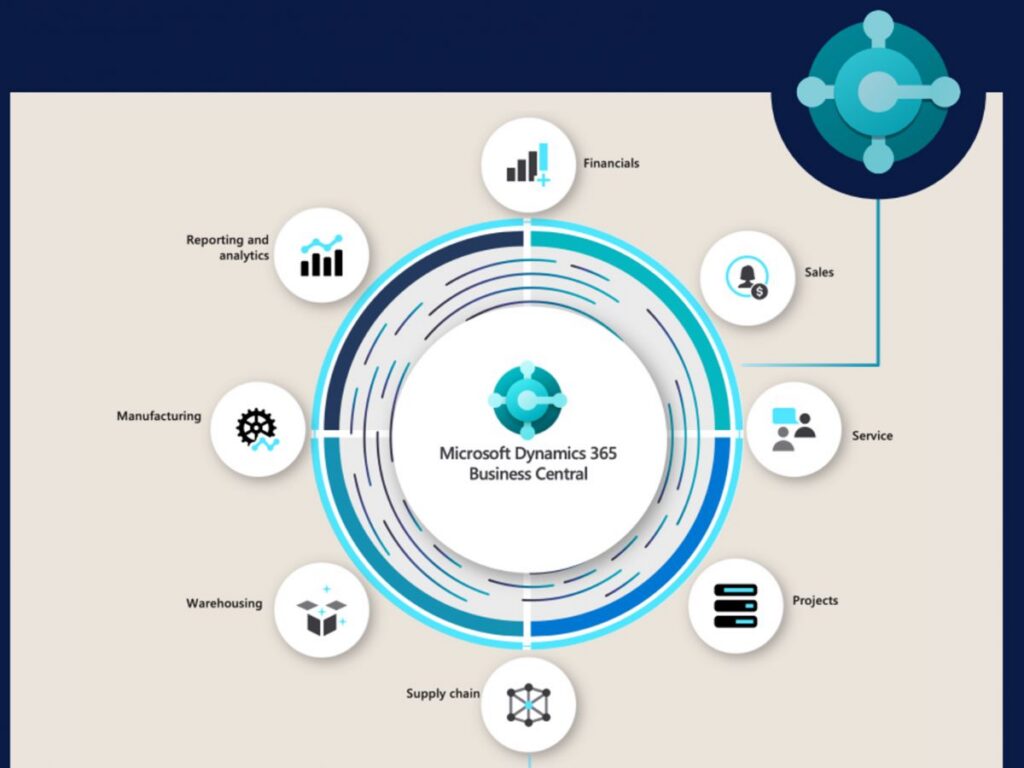
Microsoft Dynamics 365 Business Central is an ERP solution from Microsoft. I have found it gathers business processes inside one system helping companies manage money, sales, buying, stock, projects and day‑to‑day work.
Than keeping separate programs for each department companies can use Business Central to create a single flow of data. I have seen this cut entry make reports better and let managers decide with up‑to‑date information.
Business Central is especially useful for medium firms that want the power of a modern ERP without the hassle of juggling many separate apps.
Benefits of Microsoft Dynamics 365 Business Central
1. Better Financial Management
Business Central gives tools for accounting bills owed money owed, budgets, cash flow and financial reports. Companies see their money status clearly and make smarter choices.
2. Improved Inventory Management
Keeping inventory right is vital for firms that ship, make, sell goods or run stores. Business Central lets companies watch stock levels, buying, sales and movements from one place.
3. Streamlined. Purchasing
The platform links sales and buying with stock and money data. I have seen this cut hand‑work. Keep data the same in every department.
4. Real-Time Reporting and Insights
Leaders need data to decide quickly. Business Central gives reports and analysis that let companies watch numbers and spot ways to grow.
5. Scalability
When a company grows its ERP needs may shift. Business Central supports firms as they add work, people, products, sites and procedures.
Why Choose a Microsoft Business Central Partner?
Choosing the Microsoft Business Central Partner is a key decision when using this platform. I have worked with partners who guide a firm from planning through setup to ongoing help.
A qualified partner can learn a firm’s processes, spot improvement spots set up Business Central to fit needs and teach workers how to use the system well.
A partner can also decide if standard Business Central is enough or if extra extensions, connections or custom tweaks are needed.
Understanding Microsoft Business Central Implementation
Microsoft Business Central Implementation is more than installing software. I have seen that it is a step‑by‑step process that turns a firm’s needs into a working ERP system.
A typical implementation may include the stages:
Business Requirement Analysis
First learn a firm’s current work, problems, goals and ERP needs. This builds a roadmap that matches business demands.
System Configuration
Next Business Central is set up to fit a firm’s money, sales, buying, stock and daily work needs.
Data Migration
Old data may have to move from spreadsheets, old ERP systems, accounting software or other apps into Business Central. Review and clean data first to avoid mistakes.
Integration and Customization
Some firms need links to CRM, online stores, payroll, banks or other apps. When needed Business Central can add features to support those processes.
Testing
Testing is essential. Companies must check workflows, reports, connections, permissions and moved data before the system starts.
Training and Go-Live
Workers need training to learn the new ERP. Once testing and training finish the firm can launch with help from the implementation team.
How Business Central Works, as an ERP Solution
Business Central ERP links parts of an organization through a single system. Financial records can be tied to sales and purchasing actions and inventory data can be connected to orders and delivery.
This single system can break down information silos. Give employees a clearer consistent view of how the business runs.
For instance when a sales order is entered the related inventory and financial data can be linked to that order. This cuts the need to move data manually across systems.
Who Can Benefit from Business Central?
Microsoft Dynamics 365 Business Central is suitable for small and medium businesses, such as those in distribution, professional services, manufacturing, retail, wholesale and other fields.
Business Central can be especially valuable for businesses that have outgrown spreadsheets or basic accounting systems and need control over their financial and operational processes.
Best Practices for a Successful Business Central Implementation
Organizations can improve their implementation results by following best practices:
- Define clear ERP goals before starting the project.
- Document existing business processes.
- Identify opportunities to simplify workflows.
- Validate data before migration.
- Involve employees throughout the project.
- Test the system before go-live.
- Provide user training.
- Choose an implementation partner.
- Plan for support and system optimization.
The goal should not be only to copy every existing process into a system. Instead organizations should use the implementation as a chance to improve workflows and set up more effective processes.
Frequently Asked Questions
1. What is Microsoft Dynamics 365 Business Central?
Microsoft Dynamics 365 Business Central is an ERP solution that helps businesses manage financials, sales, purchasing, inventory, projects, operations and reporting from a platform.
2. What does a Microsoft Business Central Partner do?
A Microsoft Business Central Partner helps organizations plan, configure, customize, implement, integrate and support Business Central according to their business requirements.
3. How long does Microsoft Business Central Implementation take?
The timeline depends on factors such as company size, number of users, data complexity, integrations, customizations and business requirements. A defined implementation plan can help keep the project on track.
4. Can Business Central integrate with Microsoft products?
Yes. Business Central can work within the Microsoft ecosystem and can be connected with various Microsoft and third‑party applications depending on business requirements.
5. Is Business Central for growing businesses?
Yes. Business Central is designed to support growing organizations by providing integrated ERP capabilities and allowing businesses to expand their use of the system as their requirements evolve.
6. Does Business Central support cloud‑based ERP?
Yes. Business Central is available as an ERP solution allowing businesses to access their ERP environment while benefiting from Microsoft’s cloud infrastructure and regular service updates.
Microsoft Dynamics 365 Business Central gives businesses a way to manage finance, sales, inventory, purchasing, operations and reporting through a single connected ERP platform.
By replacing systems and manual tasks with a single solution organizations can improve visibility, efficiency and decision‑making.
However technology alone does not guarantee ERP success. Effective Business Central implementation requires planning, accurate data migration, proper configuration, employee training and ongoing optimization.
Working with a Microsoft Business Central Partner can help businesses navigate these stages and build an ERP environment that matches long‑term goals.
For organizations looking for an integrated Business Central ERP solution Microsoft Dynamics 365 Business Central can provide a strong foundation, for digital transformation and sustainable business growth.
Reach Out to Us :
Call Us- +91-9711880864
Mail at – info@fermion.co.in
Visit us- https://fermion.co.in/