Revolutionizing Retail: How Microsoft Dynamics 365 Business Central Empowers Businesses

In the fast-paced world of retail, staying ahead of the competition is key to success. From managing inventory to engaging customers, retailers face a multitude of challenges every day. Fortunately, there’s a powerful tool that’s revolutionizing the way retail businesses operate: Microsoft Dynamics 365 Business Central (D365 BC).

What is Microsoft Dynamics 365 Business Central?

Dynamics 365 Business Central is an all-in-one business management solution designed specifically for small and medium-sized retailers. It integrates seamlessly with other Microsoft tools like Office 365, giving retailers access to a comprehensive suite of business applications in one unified platform.

Simplifying Operations

With D365 BC, retailers can streamline their operations and improve efficiency across the board. From inventory management to financials, everything is seamlessly integrated, eliminating the need for multiple disparate systems. This means less time spent on manual data entry and more time focusing on growing your business.

Managing Inventory with Ease

One of the biggest challenges retailers face is managing inventory effectively. With D365 BC, retailers can track inventory levels in real-time, optimize stock levels, and automate replenishment processes. This ensures that shelves are always stocked with the right products, minimizing stockouts and lost sales.

Enhancing Customer Engagement

In today’s competitive retail landscape, customer engagement is more important than ever. D365 BC provides retailers with powerful tools to understand their customers better and deliver personalized shopping experiences. With integrated CRM capabilities, retailers can track customer interactions, analyze buying patterns, and target promotions more effectively.

Making Informed Decisions

Data-driven decision-making is essential for success in retail. With D365 BC, retailers have access to advanced analytics and reporting tools that provide insights into sales performance, inventory trends, and customer behavior. This enables retailers to make informed decisions quickly and adapt to changing market conditions.

Conclusion

In conclusion, Microsoft Dynamics 365 Business Central is a game-changer for retailers looking to streamline their operations, enhance customer engagement, and make informed decisions. By leveraging the power of this comprehensive business management solution, retailers can stay ahead of the competition and thrive in today’s dynamic retail environment.


A Guide to Sales Reporting and Dashboards in Microsoft Dynamics 365 Business Central

In the dynamic world of business, having timely and accurate insights into sales performance is crucial for making informed decisions and driving growth. With Microsoft Dynamics 365 Business Central (D365 BC), businesses can harness the power of robust sales reporting and dashboards to gain valuable insights into their sales operations. In this blog post, we’ll explore the key features and benefits of sales reporting and dashboards in D365 BC and how they can empower organizations to optimize their sales strategies.

Understanding Sales Reporting in D365 BC

Sales reporting in D365 BC provides businesses with comprehensive visibility into their sales activities, allowing them to track sales performance, analyze trends, and identify opportunities for improvement. With customizable reports and analytics tools, users can generate insights tailored to their specific business needs.

  1. Customizable Reports: D365 BC offers a range of pre-built sales reports that cover various aspects of sales performance, including sales orders, invoices, and customer sales history. These reports can be customized to filter data based on specific criteria such as time period, product category, or customer segment.
  2. Real-Time Data Access: Sales reports in D365 BC provide real-time access to sales data, ensuring that businesses always have up-to-date information at their fingertips. This enables users to make timely decisions and respond quickly to changing market conditions.
  3. Drill-Down Capabilities: D365 BC allows users to drill down into sales data to gain deeper insights and identify underlying trends or patterns. For example, users can drill down from summary sales figures to view detailed transactional data for individual sales orders or customers.

Harnessing the Power of Sales Dashboards

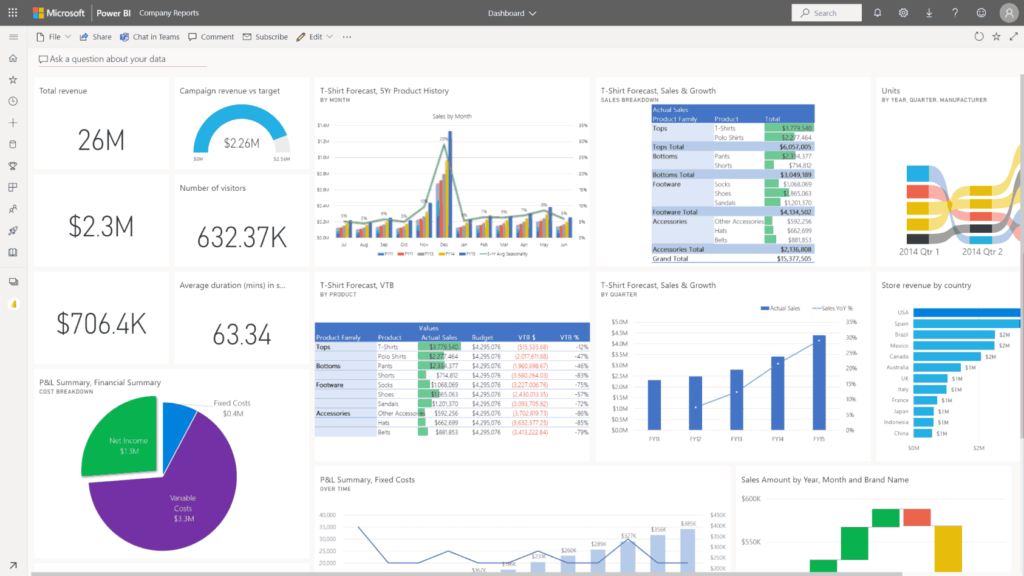
Sales dashboards in D365 BC offer a visual representation of key sales metrics and KPIs, providing users with a quick and intuitive way to monitor sales performance and track progress towards goals. Dashboards can be customized to display relevant information tailored to the needs of different users or roles within the organization.

  1. Customizable Dashboards: D365 BC allows users to create custom sales dashboards with configurable widgets and visualizations, such as charts, graphs, and KPI indicators. Users can choose which metrics to display on their dashboard and arrange them in a layout that best suits their preferences.
  2. Interactive Visualizations: Sales dashboards in D365 BC feature interactive visualizations that allow users to explore sales data dynamically. Users can interact with charts and graphs to drill down into specific data points or filter data based on different criteria, providing a deeper level of insight into sales performance.
  3. Mobile Accessibility: D365 BC’s sales dashboards are accessible from any device with a web browser, including smartphones and tablets. This enables sales teams to stay informed and engaged while on the go, whether they’re in the office, on the road, or working remotely.
Conclusion

In conclusion, sales reporting and dashboards in Microsoft Dynamics 365 Business Central offer powerful tools for gaining insights into sales performance and driving business success. By leveraging customizable reports and interactive dashboards, businesses can make informed decisions, optimize sales strategies, and achieve their sales goals more effectively. Whether you’re a sales manager tracking team performance or a business owner monitoring overall sales trends, D365 BC’s sales reporting and dashboards provide the visibility and flexibility you need to succeed in today’s competitive marketplace.

The Power of CRM in Microsoft Dynamics 365 Business Central

In the fast-paced world of business, building and maintaining strong relationships with customers is crucial for success. Customer Relationship Management (CRM) plays a pivotal role in achieving this goal, and when seamlessly integrated into Microsoft Dynamics 365 Business Central, it becomes a game-changer. In this blog, we’ll explore the transformative impact of CRM in Business Central and how it can elevate your business to new heights.

Understanding CRM in Business Central: Customer Relationship Management in Microsoft Dynamics 365 Business Central is like having a personal assistant dedicated to managing all aspects of your interactions with customers. It’s a centralized hub that empowers businesses to cultivate meaningful relationships, streamline processes, and make informed decisions based on customer data.

  1. 360-Degree Customer View: One of the standout features of CRM in Business Central is the ability to have a complete 360-degree view of your customers. All interactions, from sales and service to communication history, are consolidated in one place. This holistic view ensures that your team has the information they need to provide personalized and efficient service.
  2. Efficient Sales Processes: CRM in Business Central streamlines sales processes by automating repetitive tasks, such as data entry and follow-ups. This automation not only saves time but also minimizes the risk of human error, allowing your sales team to focus on building relationships and closing deals.
  3. Targeted Marketing Campaigns: With CRM, you can analyze customer data to identify trends, preferences, and behaviors. This insight enables businesses to create targeted marketing campaigns that resonate with their audience, resulting in more effective communication and increased customer engagement.
  4. Service Excellence: CRM in Business Central enhances customer service by providing a centralized platform for managing support requests, tracking cases, and ensuring timely resolutions. This proactive approach to customer service fosters trust and loyalty, turning satisfied customers into long-term advocates for your brand.
  5. Data-Driven Decision Making: Leveraging CRM data, businesses can make informed decisions. From forecasting sales trends to identifying areas for improvement in customer service, the analytics and reporting features in Business Central’s CRM empower organizations to adapt and thrive in a competitive market.
Conclusion:

Incorporating CRM into Microsoft Dynamics 365 Business Central is not just a technological upgrade; it’s a strategic investment in the heart of your business – your customer relationships. By providing a comprehensive view of customer interactions, streamlining processes, and fostering data-driven decision-making, CRM in Business Central is a catalyst for business success. As you explore the potential of CRM in this robust platform, you’re not just managing customers; you’re building lasting connections that drive growth and propel your business into a future of sustained success.

What is a Vendor Portal?

A vendor portal is a web-based platform that allows businesses to interact and collaborate with their vendors, suppliers, or external partners. It serves as a centralized hub where various stakeholders in the supply chain can access and exchange information, conduct transactions, and manage business processes. Vendor portals are designed to streamline communication, enhance collaboration, and improve overall efficiency in the procurement and vendor management processes.

Here are some advantages of using a vendor portal:

Centralized Information: Vendor portals provide a centralized location for all relevant information, such as product catalogs, pricing details, order history, and invoices. This helps both the company and its vendors access up-to-date and accurate information.

Real-time Collaboration: The portal facilitates real-time collaboration between the company and its vendors. This can include communication on order status, inventory levels, and other important updates, leading to better coordination in the supply chain.

Efficient Procurement: Vendor portals streamline the procurement process by allowing vendors to submit electronic quotes, receive purchase orders, and manage order fulfillment online. This automation reduces paperwork, minimizes errors, and accelerates the procurement cycle

Order Tracking and Visibility: Both parties can track the status of orders and shipments through the portal. This visibility helps in proactively addressing any issues related to delays, stockouts, or other logistics challenges.

Improved Communication: Enhanced communication channels within the vendor portal lead to better understanding and alignment between the company and its vendors. This reduces the likelihood of miscommunication and fosters a stronger business relationship.

Cost Savings: The automation of procurement processes and reduction in manual paperwork contribute to cost savings for both the company and its vendors. This can lead to more competitive pricing and increased overall efficiency.

Compliance Management: Vendor portals often include features to manage and ensure compliance with contractual agreements, quality standards, and regulatory requirements. This helps maintain consistency and quality in the supply chain.

Data Analytics: Vendor portals may incorporate analytics tools that provide insights into purchasing patterns, supplier performance, and other key metrics. This data-driven approach can inform strategic decision-making and optimization of the supply chain.

Scalability: Vendor portals can easily scale to accommodate growing business needs and an increasing number of vendors. This scalability ensures that the platform remains effective as the company expands its operations.

In summary, a vendor portal is a valuable tool for fostering collaboration, improving efficiency, and strengthening relationships between companies and their vendors or suppliers.

What is Supply Chain Management?

Supply Chain Management (SCM) is the backbone of any successful business, weaving a complex web that connects manufacturers, suppliers, distributors, and retailers. It involves the coordination and optimization of various processes to ensure the smooth flow of goods and services from the point of origin to the end consumer. In this blog post, we will delve into the importance of supply chain management and how it plays a pivotal role in the success of businesses worldwide.

The Foundation of Efficient Operations:

A well-structured supply chain is crucial for maintaining efficient operations within a company. It encompasses everything from procurement and production to logistics and distribution. By streamlining these processes, businesses can minimize costs, reduce waste, and enhance overall productivity. Effective supply chain management is, therefore, a key driver in achieving operational excellence.

1.Cost Optimization:

One of the primary goals of supply chain management is cost optimization. SCM allows businesses to identify areas where costs can be reduced without compromising the quality of products or services. Through efficient inventory management and strategic sourcing, companies can negotiate better deals with suppliers, minimize carrying costs, and ultimately enhance their bottom line.

2.Customer Satisfaction:

In an era where customer satisfaction is paramount, a well-managed supply chain plays a pivotal role in meeting and exceeding customer expectations. SCM ensures that products are available when and where customers need them. Timely deliveries, accurate order fulfillment, and responsive customer service contribute to an enhanced customer experience, fostering loyalty and positive brand perception.

3.Risk Mitigation:

Supply chain management is not only about optimizing processes but also about anticipating and mitigating risks. External factors such as natural disasters, geopolitical events, and economic fluctuations can disrupt the supply chain. Through effective risk management strategies, businesses can build resilience, ensuring continuity even in the face of unforeseen challenges.

4.Innovation and Adaptability:

In today’s dynamic business landscape, adaptability is key. Supply chain management encourages innovation by constantly seeking ways to improve efficiency and reduce costs. Embracing new technologies, implementing data-driven decision-making processes, and staying ahead of industry trends are all crucial elements of a forward-thinking supply chain strategy.

5.Global Reach:

As businesses expand globally, the importance of an effective supply chain becomes even more pronounced. Supply chain management facilitates the movement of goods across borders, ensuring compliance with international regulations and optimizing transportation routes. This global perspective is essential for companies looking to tap into new markets and diversify their customer base.

Conclusion:

In conclusion, supply chain management is the silent force that propels businesses toward success. From optimizing costs and ensuring customer satisfaction to mitigating risks and fostering innovation, an efficient supply chain is indispensable in today’s competitive business environment. Companies that prioritize and invest in robust supply chain management are better positioned to navigate challenges, capitalize on opportunities, and ultimately thrive in the ever-evolving marketplace.

What is An ERP ?

Introduction:

In the rapidly evolving landscape of business, organizations are constantly seeking ways to streamline their operations, enhance collaboration, and drive growth. Enterprise Resource Planning (ERP) systems have emerged as powerful tools to meet these challenges head-on. In this blog post, we will explore the concept of ERP and shed light on Microsoft 365 Business Central, a comprehensive solution that empowers businesses to thrive in the digital age.

Understanding ERP:

ERP, or Enterprise Resource Planning, refers to a category of software that integrates core business processes across various departments within an organization. This integration enables real-time information sharing and collaboration, providing a unified view of key metrics and processes. ERP systems typically cover areas such as finance, human resources, supply chain management, customer relationship management, and more.

Microsoft 365 Business Central:

Microsoft 365 Business Central is a cloud-based ERP solution designed for small to medium-sized enterprises (SMEs). It is part of the broader Microsoft 365 suite, bringing together familiar productivity tools with robust ERP functionality. Business Central is built on the Dynamics 365 platform, ensuring seamless integration with other Microsoft applications.

Advantages of Microsoft 365 Business Central:

  1. Unified Platform: One of the primary advantages of Business Central is its integration with Microsoft 365 applications like Outlook, Word, and Excel. This unified platform promotes collaboration, as employees can work within familiar tools while accessing ERP features seamlessly.
  1. Scalability: Business Central is highly scalable, making it suitable for growing businesses. As organizations expand, the system can easily adapt to increased data volumes and transaction complexities, ensuring continued support for evolving needs.
  1. Streamlined Financial Management: The finance module in Business Central offers comprehensive tools for managing budgets, tracking expenses, and generating financial reports. This enables organizations to make informed financial decisions, promoting fiscal responsibility and sustainability.
  1. Efficient Supply Chain Management: Business Central’s supply chain management capabilities help organizations optimize inventory levels, improve order fulfillment, and enhance overall supply chain visibility. This results in reduced operational costs and improved customer satisfaction.
  1. Enhanced Customer Relationship Management (CRM):The CRM features in Business Central enable businesses to manage customer interactions, track sales opportunities, and deliver personalized services. This enhances customer satisfaction and loyalty, contributing to long-term success.
     
    Conclusion:

    In conclusion, Microsoft 365 Business Central stands as a powerful ERP solution tailored for small to medium-sized enterprises. Its seamless integration with Microsoft 365 applications, scalability, and comprehensive features across various business functions make it an invaluable tool for organizations aiming to enhance efficiency, collaboration, and overall business performance. As businesses continue to navigate the complexities of the digital era, Business Central offers a strategic advantage by providing a unified platform that fosters growth and success.

Why Microsoft Power BI

Explore the top reasons organisations choose Power BI to meet their self-service and enterprise business intelligence (BI) needs.

Reinvent Report building with Copilot in Power BI

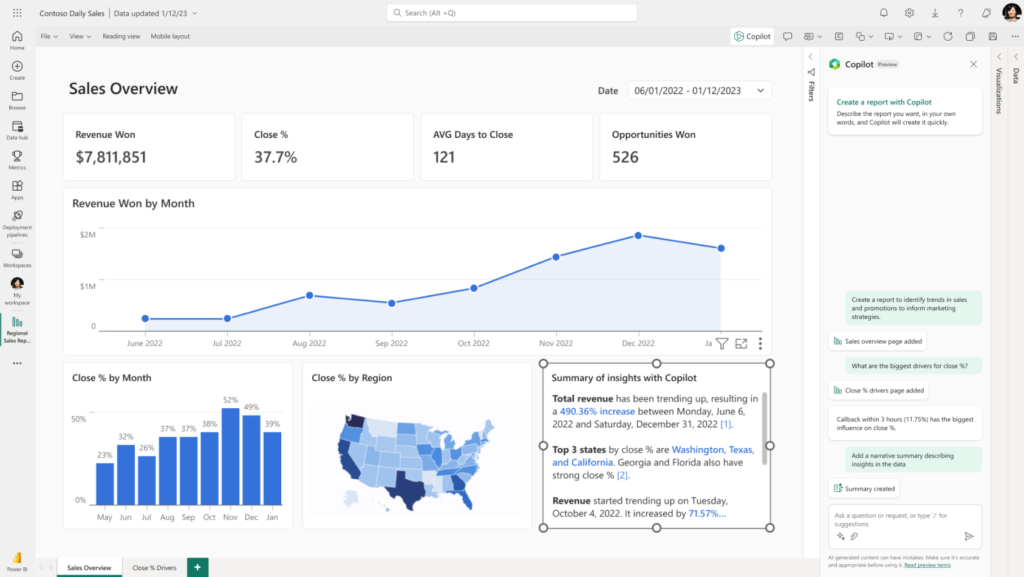
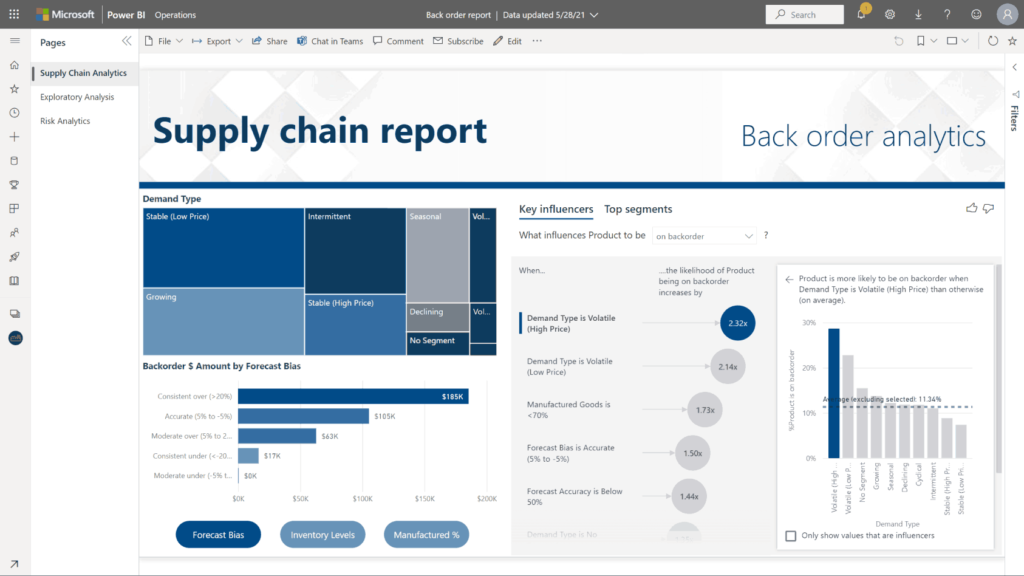
Uncover insights faster with Copilot in Power BI. Describe what you need—including reports, narrative summaries, and calculations—or ask a question about your data, and Copilot analyses, pulls, and visualizes the right information.

Unify self-service and enterprise analytics

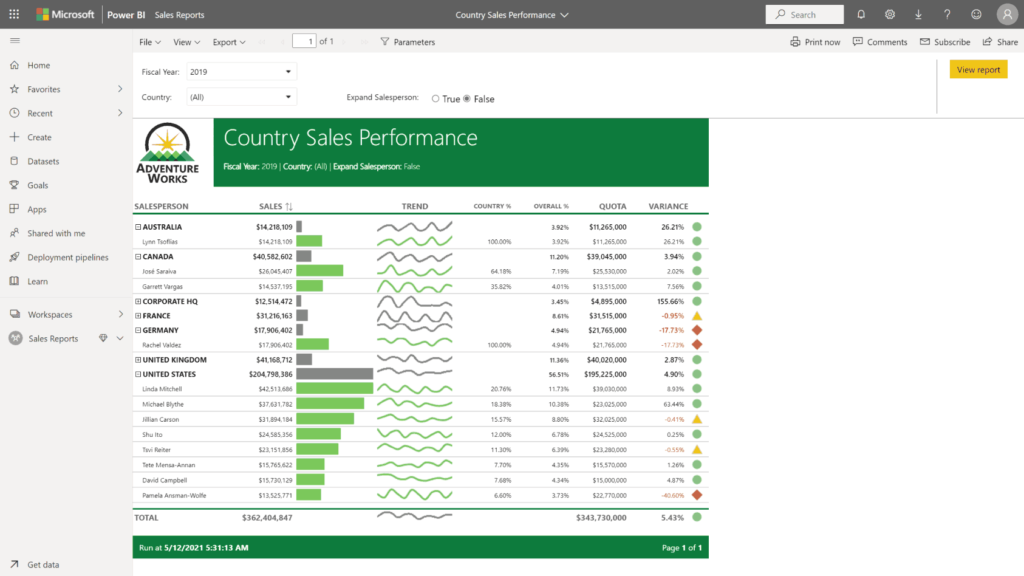
Meet both your self-service and enterprise data analytics needs on a single platform. Access powerful semantic models, an application lifecycle management (ALM) toolkit, an open connectivity framework, and fixed-layout, pixel-perfect paginated reports.


Create deeper, more helpful insights

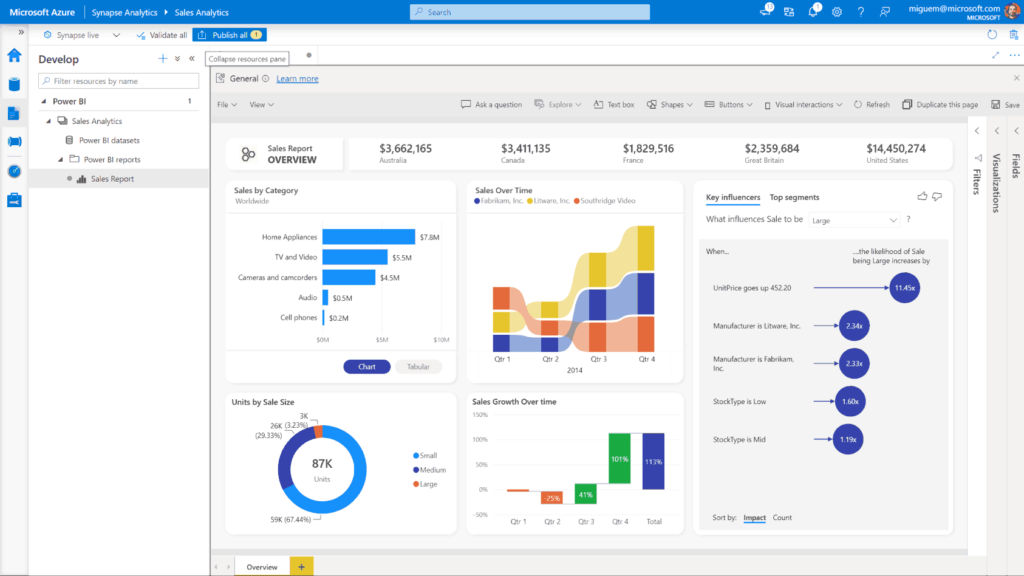
Turn your data into a competitive advantage by using Power BI and Azure together to connect, combine, and analyse your entire data estate.

Find answers fast with industry-leading AI

Take advantage of the latest advances in Microsoft AI to help non-data scientists prepare data, build machine learning models, and find insights quickly from both structured and unstructured data, including text and images.

Improve publishing efficiency and accuracy of BI content

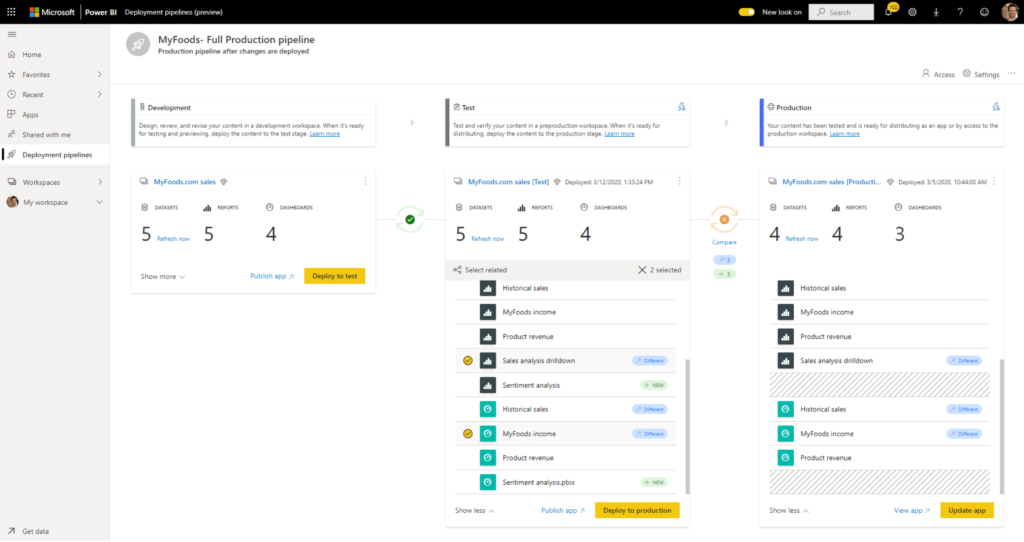
Quickly identify differences and move content from development and testing to production with confidence using the simple visual cues in deployment pipelines.

Get unparalleled Excel interoperation

Anyone who’s familiar with Microsoft 365 can easily connect Excel queries, data models, and reports to Power BI Dashboards—helping to quickly gather, analyse, publish, and share Excel business data in new ways.

Turn insights into action

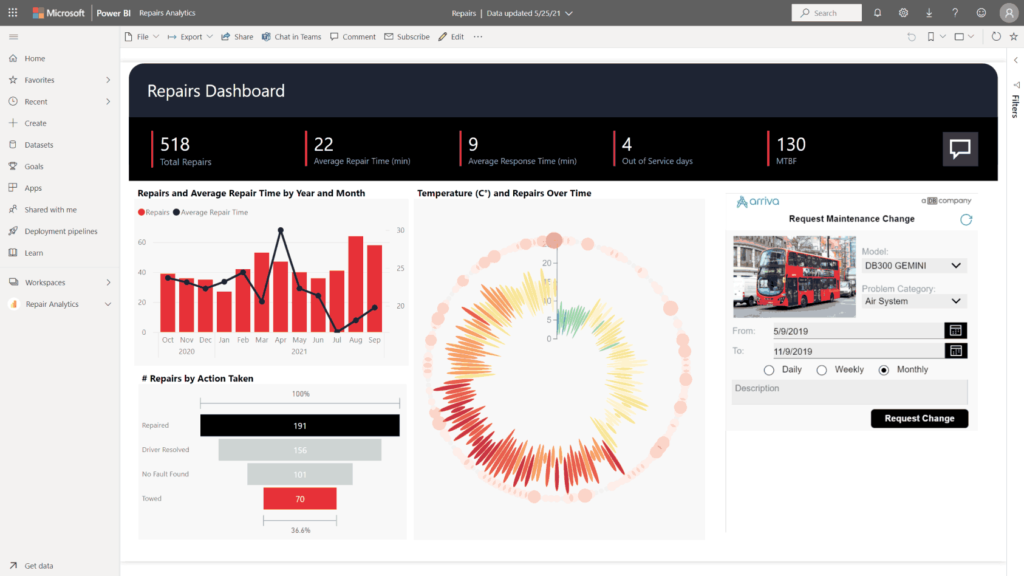
Go from data to insights and insights to action with Microsoft Power Platform—combining Power BI with Power Apps and Power Automate to easily build business applications and automate workflows.

Stream analytics in real time

Know what’s happening now, not just in the past. From factory sensors to social media sources, get access to real-time analytics so you’re always ready to make timely decisions.

Plan and prepare for Dynamics 365 Business Central in 2022 release wave 2

Overview

Dynamics 365 Business Central is a comprehensive business application solution designed and optimized for small and midsized organizations.

Additional updates in 2022 release wave 2 include:

  • Seamless service: No matter the industry type of a small or midsized business (SMB), business users expect a dependable service and platform that they can run their business on.
  • Administration: Business Central delivers a set of features for better and improved communication about the health of each environment.
  • Application: Continue to improve the application to support integration with Shopify. The finance and supply chain capabilities in Business Central are improved with several optimizations and enhancements so that users can run their business processes more efficiently.
  • Better with Microsoft 365: Improve the efficiency of collaborative business processes in Microsoft Teams. Users can pin cards inside Teams, and delegated admins can now use the Excel add-in.
  • Country and regional: In 2022 release wave 2, Business Central is generally available in more countries and regions.
  • Onboarding: Organizations can get to productive usage faster because it’s easier to discover and install apps.
  • Development tools: Moved entirely to Visual Studio Code.
  • Power Platform: More efficient automation with Power Automate so that users can set up workflows for the specific needs of their organization.

Check out the release plan:

https://aka.ms/Plan/2022RW2/BusinessCentral